Payment Open API
Hello Developer!
👋 Welcome to TConnect Payment Open API — a comprehensive automated payment solution for any system, from ERP, PMS, HIS, AI applications to Kiosk and POS devices. Explore this documentation to find the payment model that best suits your project!
For AI / Agents
What can this API do?
| Feature | Description |
|---|---|
| 🔐 JWT Authentication | Login and manage secure sessions with Access Token + Refresh Token |
| 🔳 Create QR Code | Generate static or dynamic QR codes containing order amounts |
| 🔔 IPN Callback | Receive instant payment success notifications |
| 📟 Push to Devices | Push payment information to POS machines or Soundbox speakers |
| 📊 Transaction History | Query QR, card, and cash transactions with pagination |
| ⚙️ Service List | Check which payment gateways are currently licensed |
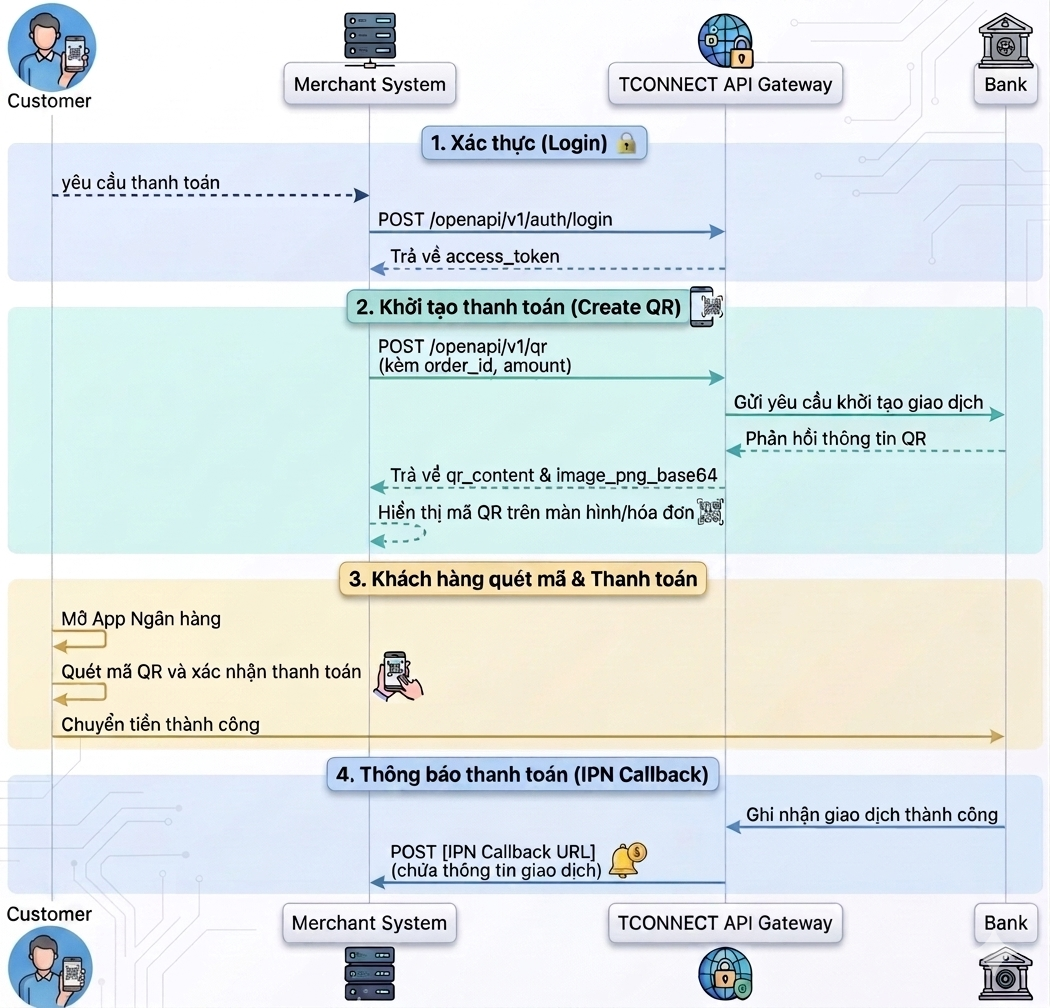
1. QR Payment Flow
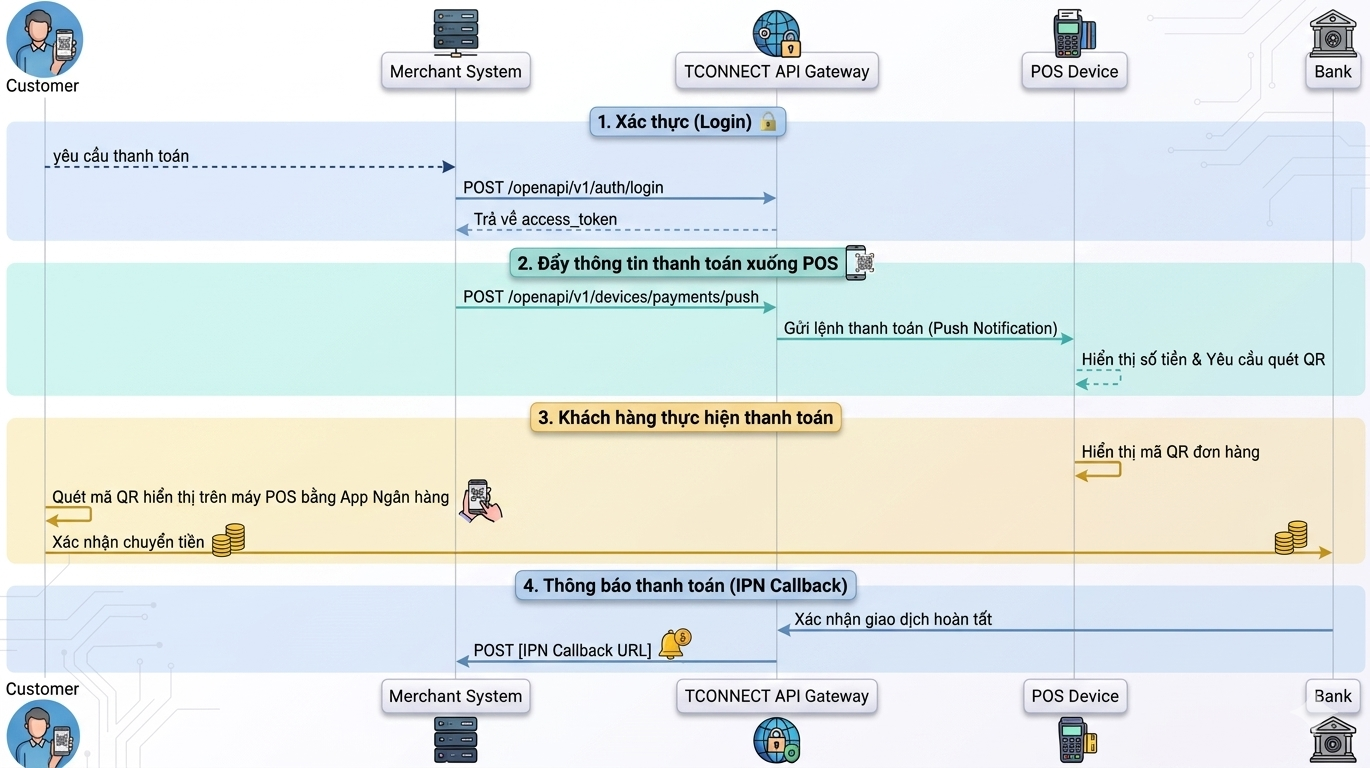
2. QR Payment Flow on Devices (POS, Soundbox)
Environment Information
| Environment | Base URL |
|---|---|
| Staging | https://sme-open-api-sandbox.tconnect.vn |
| Production | Provided after testing is complete |
Security Note
All Request Body and Response Body must be AES-256-CBC encrypted.
See details at Encryption Parameters.
Sandbox Test Credentials
Ready to use
The Sandbox values below are ready for you — or an AI/Agent — to run the full Login → Get Services → Create QR → Check Order Status flow with no extra setup. These are the same values found in the downloadable spec (single-file).
| Item | Value |
|---|---|
| Base URL | https://sme-open-api-sandbox.tconnect.vn |
| Partner-Code | KH_0000024 |
| OAuth Username | [email protected] |
| OAuth Password | N343#2^zPDLOx4{v |
| Client ID | sh6dhA4hTu-rE0AFhgtHtg |
| Client Secret Key | GsUppywKmcPyJUk6lwajsQ6CHtxbEXJ8 |
| AES Secret Key (hex, 32 bytes) | 5fed5c2bd6d5ea44d33d71b3bdd02193bb28ea3ad026f85a07c82d70536d1f91 |
| Merchant CIF | KH_0000024 — this is internal_code in Create VA; for this partner CIF = Partner-Code |
| Origin bank account no | 31052426 — the bank_account_no in Create VA |
Values discovered from the sandbox (needed for Create QR / Check Status):
| Item | Value | How to obtain |
|---|---|---|
x-service-code | vccb-qr | From Get Services (payment_method=qr) — BVBank QR service |
bincode | 970454 | Provider BIN of BVBank (VCCB) |
va / acc_no (receiving VA) | 99MPI0000342300013 | Merchant receiving VA — use as va in Create QR and acc_no in Check Order Status |
Note
- Sandbox environment only — do not use in production.
- AI/Agents & scripts: the WAF returns 403 for default clients (
curl,python-urllib…). Always send a real browserUser-Agent, e.g.Mozilla/5.0 (Macintosh; Intel Mac OS X 10_15_7) AppleWebKit/537.36 (KHTML, like Gecko) Chrome/124.0 Safari/537.36.
Next Steps
- 👉 API Overview — API overview and environments
- 👉 API Login — Start from the authentication step
- 👉 Get Services — Get the list of payment services